

How to Dress for a Virtual / Online Interview
The best virtual interview dress code is professional attire from waist up—solid colors in navy, charcoal, or light blue paired with proper lighting, eye-level camera positioning, and a clean background.
How to Dress for a Virtual / Online Interview
The best virtual interview dress code is professional attire from waist up—solid colors in navy, charcoal, or light blue that provide camera contrast, paired with proper lighting (window or ring light), eye-level camera positioning, and a clean background. This combination ensures professional appearance across Zoom, Teams, and all video platforms globally.
Quick Answer: What to Wear for Virtual Interviews
For virtual interviews, dress professionally from the waist up as you would for in-person interviews. Wear solid-color shirts or blouses in camera-friendly colors (navy, charcoal, light blue, white) that contrast with your background. Avoid patterns, stripes, and bright colors that cause camera distortion. Position yourself with natural window light facing you or use a ring light. Ensure eye-level camera angle with a clean, minimal background. This standard works across all industries, regions, and video platforms globally.
CLOTHING
Solid colors, professional attire
COLORS
Navy, charcoal, light blue, white
LIGHTING
Window light or ring light facing you
CAMERA
Eye level, arm’s length away
This setup works for 95% of virtual interviews across all video platforms—Zoom, Teams, Google Meet, WebEx, Skype.
Not Sure What to Wear to Any Interview?
Whether it’s virtual or in-person, getting your outfit right makes a powerful first impression. Explore the ultimate guide that covers everything from suits and shirts to colors and accessories — trusted by job seekers worldwide.
Read the Complete Interview Dress Guide →
Best Colors for Virtual Interview Success
Camera-friendly interview colors: Navy blue, charcoal grey, light blue, and white are the safest colors for virtual interviews. These provide excellent contrast against most backgrounds, photograph well in HD cameras, and appear professional across all skin tones. Avoid patterns, stripes, bright colors, and pure black which cause camera distortion or washing out.
✓ Camera-Friendly Colors
- Navy blue: Universal safe choice, high contrast
- Charcoal grey: Professional, modern, neutral
- Light blue: Calming, approachable, HD-friendly
- White: Clean, formal (needs good lighting)
- Soft pastels: Light pink, lavender, mint (solid only)
✗ Avoid These on Camera
- Patterns: Stripes, checks, plaids cause moiré effect
- Bright colors: Neon, red, orange distort on HD cameras
- Pure black: Absorbs light, creates harsh silhouette
- Pure white backgrounds: Washing out, overexposure
- Busy prints: Distracting, unprofessional on video
Contrast Rule for Virtual Interviews
Your clothing should contrast with your background.
- Light background → Wear darker colors (navy, charcoal)
- Dark background → Wear lighter colors (white, light blue)
- Neutral background → Most colors work
- Test appearance before interview using video preview
Virtual Interview Essentials: Lighting & Audio Gear
Elevate your online interview presence with high-quality lighting and clear audio — proven to make you stand out on camera.

Mobilife RGB Video Light
Double-sided RGB LED lamp with clip-on design, soft/strong light modes, CCT & 20 effects — ideal for camera phones and laptops.
View Lighting Light →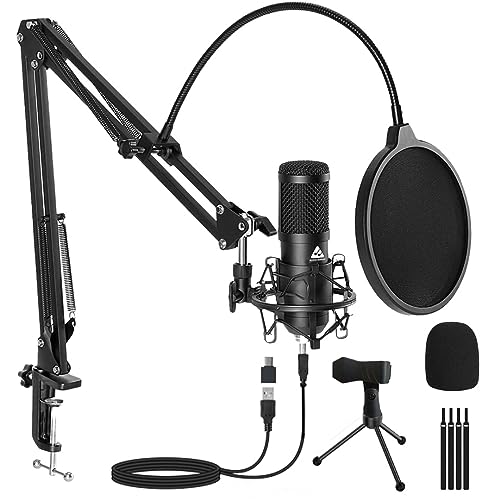
AM-C1 USB Condenser Mic Kit
Complete USB microphone kit with boom arm, pop filter, shock mount, tripod & 2.5m cable — professional audio for interviews and streaming.
View Microphone Kit →Professional Lighting Setup for Virtual Interviews
Lighting is more important than clothing for virtual interviews. Position yourself facing a window with natural daylight, or use a ring light/LED panel placed behind your camera at eye level. Light should illuminate your face evenly without harsh shadows. Avoid backlighting (window behind you) which creates silhouettes. Test lighting 30 minutes before interview and adjust based on time of day.

☀️ Natural Window Light (Best Option)
Free, flattering, professional.
Setup:
- Position desk facing window
- Sit 3-6 feet from window
- Window should be in front of or beside you (never behind)
- Diffuse harsh sunlight with sheer curtain
- Best times: mid-morning or afternoon (avoid noon harshness)
Pro Tip: Natural light changes throughout day—test 30 min before interview.
💡 Ring Light / LED Panel (Artificial Option)
Consistent, controllable, year-round reliable.
Setup:
- Place ring light directly behind camera at eye level
- Position 2-3 feet from your face
- Use warm white temperature (3000-3500K) for natural skin tone
- Adjust brightness to 60-80% (avoid overexposure)
- Add secondary light at 45° angle if available (reduces shadows)
Investment: $20-$60 ring lights work perfectly for interviews.
❌ Lighting Mistakes to Avoid
- Backlighting: Window or bright light behind you creates dark silhouette
- Overhead lighting only: Creates harsh shadows under eyes and nose
- Side lighting only: Half face in shadow, unprofessional appearance
- No lighting: Dark, grainy video feed reduces professionalism
- Mixed color temperatures: Warm + cool lights create unnatural skin tones
Quick Lighting Test Checklist
Before Interview:
- Open video preview 30 minutes early
- Check for harsh shadows on face
- Verify face is evenly lit (no dark spots)
- Ensure background isn’t brighter than face
- Test multiple positions if needed
Signs of Good Lighting:
- Face clearly visible, natural skin tone
- Eyes bright and visible (not shadowed)
- Soft, even illumination across face
- No harsh contrasts or dark areas
- Background slightly darker than face
Camera Positioning and Framing for Professional Appearance
Camera positioning is critical for professional virtual interviews. Position camera at eye level, arm’s length away (approximately 2-3 feet). Frame yourself from mid-chest to top of head with small space above. Look directly at camera when speaking (not at screen) to maintain eye contact. Use laptop stand or external webcam on monitor to achieve proper height. Test framing and positioning before interview starts.
✓ Correct Camera Position
- Height: Camera at eye level or slightly above (never below)
- Distance: Arm’s length away (2-3 feet)
- Framing: Mid-chest to just above head
- Angle: Straight on, centered in frame
- Eye contact: Look at camera lens (not screen)
✗ Camera Position Mistakes
- Below eye level: Unflattering angle, looking down at interviewer
- Too close: Distorts features, claustrophobic feeling
- Too far: Lose facial expressions, disengaged appearance
- Off-center: Unprofessional, awkward framing
- Looking at screen: Breaks eye contact with interviewer
Camera Equipment Options
Laptop vs External Webcam:
- Laptop camera: Convenient, requires stand to reach eye level
- External webcam: Better quality, easier positioning on monitor
- Recommended: 1080p HD webcam ($30-$100) for best clarity
- Test beforehand: Verify video quality in preview mode
Professional Framing Guide
Vertical Framing:
- Top of frame: 2-3 inches of space above head
- Bottom of frame: Mid-chest visible
- Avoid: Cutting off top of head or showing only face
- Goal: Professional headshot appearance
Horizontal Framing:
- Center yourself: Equal space on left and right
- Upper body visible: Hands can gesture naturally
- Avoid: Off-center positioning
- Goal: Balanced, professional composition

Professional Background Setup for Virtual Interviews
Your background should be clean, minimal, and non-distracting. Best options: plain wall (white, beige, light grey), organized bookshelf, or minimal home office setup. Avoid cluttered spaces, busy backgrounds, or personal items visible. Virtual backgrounds are acceptable for professional settings (office, library) but can be glitchy—real backgrounds are safer. Ensure nothing distracting is visible behind you.
✓ Professional Background Checklist
- Clean, uncluttered space visible
- Neutral colors (white, beige, grey walls)
- Minimal decor (1-2 items max)
- Good lighting on background (not too bright or dark)
- Nothing moving or distracting (people, pets, screens)
- Organized appearance (no laundry, dishes, mess)
✗ Background Mistakes
- Clutter: Messy room, piles of items visible
- Personal items: Posters, photos, inappropriate decor
- Movement: People walking by, pets, TV on
- Bright window: Backlit, washed out face
- Unprofessional setting: Bedroom, kitchen, bathroom visible
- Virtual background glitches: Face cutting out, flickering
Virtual Background: Yes or No?
Depends on your situation:
✓ Use virtual background when:
- Real background is unavoidably distracting
- You’ve tested and it’s stable (no glitches)
- Using professional image (office, library, neutral)
✗ Avoid virtual background when:
- Real background is clean and professional
- Causes glitches, pixelation, face cutouts
- Using casual/fun images (beach, space, logos)
Virtual Interview Dress Code by Industry
Virtual interviews follow similar dress code expectations as in-person interviews, but only visible clothing matters. Dress professionally from waist up. Industry standards remain consistent—banking and law require formal attire, tech and startups are more flexible.
Banking, Law, Finance
Dress code: Formal business professional from waist up
- Men: Navy/charcoal suit jacket + white dress shirt + tie (if desired)
- Women: Navy/charcoal blazer + white blouse or professional dress
- Colors: Navy, charcoal, white, light blue
- Background: Plain wall or organized bookshelf
Standard: Same formality as in-person interview
Corporate, Government, Healthcare
Dress code: Business professional or business casual
- Men: Blazer + dress shirt (tie optional)
- Women: Blazer + blouse or professional dress
- Colors: Navy, charcoal, grey, light blue, white
- Background: Home office or neutral wall
Standard: Professional but slightly relaxed
Tech, Startups, Creative
Dress code: Business casual to smart casual
- Men: Collared shirt or polo (blazer optional)
- Women: Blouse, sweater, or professional top
- Colors: Flexible—navy, grey, light blue, pastels
- Background: Home office acceptable
Standard: Professional but relaxed (verify company culture)
Regional and Climate Considerations
Virtual interview standards are globally consistent, but regional formality expectations and climate considerations affect clothing choices. US and European companies expect business professional or business casual. Asian and Middle Eastern companies tend toward more formal attire. Climate affects fabric weight but not color choices.
🇺🇸 United States & Canada
- Corporate: Business professional standard
- Tech: Business casual acceptable
- Regional: East Coast more formal than West Coast
- Colors: Navy, charcoal, light blue universally safe
🇬🇧 United Kingdom & Europe
- Standard: Business professional expected
- UK/Germany: Very formal, conservative colors
- France/Italy: Formal but style-conscious
- Colors: Navy, charcoal, black, white preferred
🇮🇳 India & South Asia
- Corporate: Business professional mandatory
- Government: Very formal, conservative
- Tech: Business casual growing acceptance
- Colors: Navy, white, light blue safest choices
🇦🇪 Middle East
- Standard: Very formal, conservative
- Dress code: Business professional required
- Modesty: Conservative necklines, full sleeves preferred
- Colors: Navy, charcoal, white, light blue
🇸🇬 Singapore, Hong Kong, Japan
- Standard: Business professional across sectors
- Formality: High expectations, polished appearance
- Climate: Lightweight fabrics but formal colors
- Colors: Navy, white, light blue, conservative tones
🌡️ Climate Considerations
- Hot climates: Lightweight cotton, linen-blend fabrics
- Cold climates: Heavier fabrics, layering acceptable
- Colors: Remain consistent regardless of climate
- Comfort: Ensure temperature-controlled environment for interview
Quick Virtual Interview Setup Checklist
👔 Clothing (30 min before)
- Wear solid-color professional attire
- Choose navy, charcoal, light blue, or white
- Avoid patterns, stripes, bright colors
- Ensure contrast with background
- Check appearance in video preview
💡 Lighting (30 min before)
- Face window or use ring light
- Position light behind camera at eye level
- Check for harsh shadows on face
- Ensure background isn’t brighter than face
- Test at actual interview time of day
📷 Camera (15 min before)
- Position camera at eye level
- Sit arm’s length away (2-3 feet)
- Frame from mid-chest to above head
- Center yourself in frame
- Look at camera when speaking
🖼️ Background (15 min before)
- Use clean, minimal background
- Remove clutter and distractions
- Close doors, alert household members
- Test virtual background if using
- Ensure nothing moving behind you
🔊 Audio/Tech (10 min before)
- Test microphone and speakers
- Use headphones for better audio quality
- Close all unnecessary applications
- Silence phone and notifications
- Have backup device ready
✅ Final Check (5 min before)
- Join meeting 5 minutes early
- Check video preview one last time
- Verify lighting, framing, background
- Take deep breath, relax shoulders
- Smile and maintain confident posture
Common Virtual Interview Mistakes to Avoid
❌ Wearing Patterns or Stripes
Patterns, stripes, and checks cause moiré effect on HD cameras—visual distortion that’s distracting. Wear solid colors only for clean video appearance.
❌ Poor Lighting Setup
Dark, shadowy video or harsh backlighting makes you difficult to see. Position light source in front of you, never behind you.
❌ Camera Below Eye Level
Looking down at laptop camera creates unflattering angle and appears disengaged. Elevate camera to eye level using laptop stand or external webcam.
❌ Cluttered Background
Messy room, personal items, or movement behind you is distracting and unprofessional. Use clean, minimal background or test virtual background.
❌ Looking at Screen Instead of Camera
Looking at interviewer’s face on screen breaks eye contact. Look directly at camera lens when speaking to maintain professional connection.
❌ Not Testing Setup Beforehand
Technical issues during interview create stress and waste time. Test video, audio, lighting, and background 30 minutes before interview starts.
❌ Casual Attire “Because It’s Virtual”
Virtual interviews require same professionalism as in-person. Dress fully professional from waist up—no T-shirts, hoodies, or casual wear.
❌ Distracting Accessories or Jewelry
Large, sparkly, or noisy jewelry distracts on camera. Keep accessories minimal and professional for virtual interviews.
✓ What To Do Instead
- Wear solid-color professional clothing (navy, charcoal, light blue, white)
- Set up natural window light or ring light facing you
- Position camera at eye level, arm’s length away
- Use clean, minimal background (plain wall or organized space)
- Look at camera lens when speaking, not screen
- Test entire setup 30 minutes before interview time
- Dress professionally from waist up (same as in-person interview)
- Keep accessories minimal and non-distracting
“What Should I Wear?” Decision Framework for Virtual Interviews
Use this step-by-step framework to choose the perfect virtual interview outfit and setup based on your specific situation.
Step 1: Match Clothing to Industry
Choose outfit formality based on target industry:
- Banking, law, finance: Navy/charcoal blazer or suit jacket + white shirt
- Corporate, government: Blazer + professional shirt or blouse
- Tech, startups: Professional collared shirt or blouse (blazer optional)
- Creative: Smart casual professional top with solid colors
Step 2: Choose Camera-Friendly Colors
Safest Colors
Navy, charcoal, light blue, white—solid colors only
Avoid
Patterns, stripes, bright colors, pure black, pure white background
Contrast Rule
Your clothing should contrast with background color
Step 3: Set Up Professional Lighting
Choose best lighting option available:
- Option 1 (Best): Face window with natural daylight
- Option 2 (Consistent): Use ring light or LED panel behind camera
- Avoid: Backlighting (window behind you), overhead-only lighting
- Test: Open video preview 30 minutes early to verify appearance
Step 4: Position Camera Correctly
- Height: Eye level (use laptop stand or external webcam)
- Distance: Arm’s length away (2-3 feet)
- Framing: Mid-chest to just above head visible
- Angle: Straight on, centered in frame
- Eye contact: Look at camera lens when speaking
Step 5: Prepare Clean Background
Best options: Plain wall, organized bookshelf, minimal home office. Remove clutter and distractions. Virtual backgrounds acceptable if stable and professional (office, library)—test beforehand for glitches.
Universal safe setup: Navy/charcoal solid-color top + window light facing you + eye-level camera + plain background. Works for 95% of virtual interviews globally.
Frequently Asked Questions
What is the best virtual interview dress code?
The best virtual interview dress code is professional attire from waist up in solid colors (navy, charcoal, light blue, white) that contrast with your background. Wear the same level of formality you would for in-person interviews in your industry. Avoid patterns, stripes, and bright colors that cause camera distortion. Pair professional clothing with proper lighting, eye-level camera positioning, and clean background.
What are the best colors to wear for Zoom interviews?
Navy blue, charcoal grey, light blue, and white are the best colors for Zoom and virtual interviews. These solid colors photograph well on HD cameras, provide good contrast against most backgrounds, and appear professional across all skin tones. Avoid patterns, stripes, bright colors (red, orange, neon), and pure black which cause visual distortion or washing out on camera.
What is the best lighting for virtual interviews?
Natural window light facing you is the best lighting for virtual interviews. Position yourself 3-6 feet from window with natural daylight illuminating your face. Alternatively, use ring light or LED panel placed behind camera at eye level, 2-3 feet from face, with warm white temperature (3000-3500K). Avoid backlighting (window behind you) and overhead-only lighting which create shadows. Test lighting 30 minutes before interview.
Should I use a virtual background for job interviews?
Use virtual backgrounds only if your real background is unavoidably distracting and you’ve tested for stability. Professional virtual backgrounds (office, library, neutral) are acceptable if they don’t glitch or cause face cutouts. Real backgrounds are safer—plain wall, organized bookshelf, or minimal home office. Avoid casual virtual backgrounds (beach, space, logos). Always test virtual background thoroughly before interview to check for technical issues.
Where should the camera be positioned for video interviews?
Position camera at eye level, arm’s length away (2-3 feet), centered in frame. Use laptop stand or external webcam mounted on monitor to achieve proper height. Frame yourself from mid-chest to just above head with small space at top. Look directly at camera lens when speaking (not at screen) to maintain eye contact. Never position camera below eye level which creates unflattering angle.
Can I dress casually for virtual interviews since it’s remote?
No—dress professionally for virtual interviews exactly as you would for in-person interviews. Virtual format doesn’t reduce formality expectations. Wear appropriate business professional or business casual attire from waist up based on industry standards. Banking, law, and corporate require formal attire. Tech and startups allow business casual. Never wear T-shirts, hoodies, or casual clothing to virtual job interviews.
What should I avoid wearing on camera?
Avoid patterns, stripes, checks, bright colors, pure black, and pure white backgrounds for virtual interviews. Patterns cause moiré effect (visual distortion) on HD cameras. Bright colors (neon, red, orange) distort badly. Pure black absorbs light creating harsh silhouette. Avoid busy jewelry, logo shirts, and casual clothing. Wear solid-color professional attire in navy, charcoal, light blue, or white for best camera appearance.
How do I test my virtual interview setup?
Test your complete setup 30 minutes before interview time: clothing, lighting, camera position, background, audio, and video quality. Open video preview to check appearance. Verify lighting illuminates face evenly without harsh shadows. Confirm camera is eye level with proper framing. Check background is clean and minimal. Test microphone and speakers. Close unnecessary applications and silence notifications. Join meeting 5 minutes early to resolve any technical issues.
Do I need special equipment for virtual interviews?
Basic requirements: laptop/computer with camera, stable internet, and quiet space. Recommended upgrades: external HD webcam (1080p, $30-$100), ring light or LED panel ($20-$60), laptop stand for proper height, headphones with microphone for better audio. These improve video and audio quality significantly. Test all equipment before interview. Ensure backup device available in case of technical failure.
What if my home environment isn’t ideal for interviews?
Create the best possible setup with available resources: find quietest room, use plain wall as background, position camera at eye level, maximize natural light from window. If background is unavoidable issue, test professional virtual background (office, library). Inform household members of interview time to prevent interruptions. Use headphones to minimize external noise. Consider backup location (library, coworking space) if home isn’t suitable. Professional appearance and preparation matter more than perfect environment.

